Why is Klavaro the Top Choice for Windows?
Most typing software is either expensive subscriptionware or web-based tools full of distractions. Klavaro focuses on pure learning efficiency through a scientifically structured approach.
Comprehensive 4-Step Course
Klavaro isn’t just random drills. It follows a strict pedagogical path:
1. Basic Course: Memorize key positions.
2. Adaptability: Practice random keys to build neural pathways.
3. Velocity: High-speed drills with real words.
4. Fluidness: Type complete paragraphs to master rhythm.
Ultimate Layout Freedom
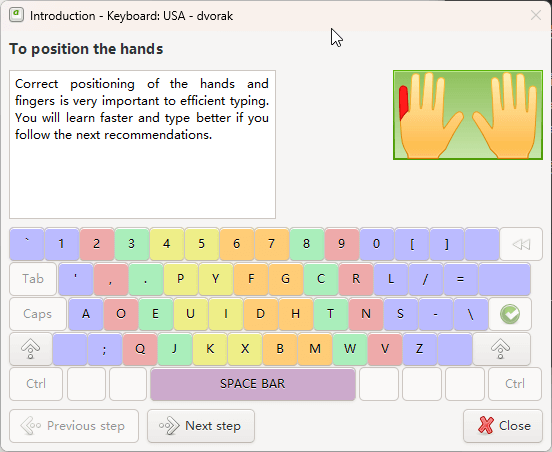
Whether you are an English speaker learning QWERTY, or an efficiency enthusiast switching to Dvorak, Colemak, or Workman, Klavaro adapts instantly.
The “Keyboard Layout Editor” allows you to configure key positions freely and save your own custom layouts as simple text files.
No Ads, Just Progress
Enjoy a distraction-free environment designed for focus. Klavaro automatically tracks your WPM (Words Per Minute) and accuracy.
It visualizes your progress with easy-to-read charts and intelligently repeats exercises where you make the most mistakes, ensuring you don’t just type fast, but type correctly.
Level Up Your Typing Setup
Speed is nothing without the right tools. Combine Klavaro with the best hardware and software to become a professional typist.
Mechanical Keyboards
Touch typing feels different on a mechanical switch. Whether you prefer Cherry MX Blue for clicks or Brown for tactile bumps, the right gear reduces fatigue.
Read our Keyboard Guide (Coming Soon)Grammarly
Klavaro trains your fingers, Grammarly trains your brain.
As your speed increases, typos happen. Grammarly catches spelling, grammar, and tone errors in real-time. It’s the perfect companion for any serious writer.
Custom Layouts
Ready to leave QWERTY behind? Klavaro supports Dvorak, Colemak, and Neo out of the box.
Learn about Layout SupportWhy Pay for Typing Software?
See how Klavaro compares to the leading paid alternatives.
Open source means you get professional features without the professional price tag.
| Feature |
Klavaro
OPEN SOURCE
|
TypingMaster Pro | KeyBlaze |
|---|---|---|---|
| Price | Free Forever ($0) | $19.90 – $29.90 | $29.99+ |
| Ads & Upsells | ✔ None | ✘ Yes (In Free Ver) | ✘ Yes |
| Custom Layouts | ✔ Unlimited Editor | Limited | Limited |
| 100% Offline | ✔ Yes (Portable) | Mostly | Yes |
| Learning Style | Pure Muscle Memory | Games / Visuals | Office / Dictation |
“Klavaro removes the clutter found in commercial software, allowing you to focus entirely on your fingers.”
What the Community Says
Klavaro is trusted by students, developers, and writers worldwide. Here is why they choose open source over paid alternatives.
“Ugly but effective”
“I’ll be honest, the interface looks like Windows 98. But unlike the flashy web apps that distract you with animations, Klavaro just works. The ‘fluidness’ exercises helped me break my 60 WPM plateau. Now I’m consistent at 95 WPM.”
“Best for learning Colemak”
“I tried switching to the Colemak layout three times and failed. Klavaro was the only tool that let me customize the learning curve. The adaptability mode is brutal—it forces you to type characters you get wrong until you master them. Highly recommended.”
“Finally, no ads!”
“I needed a typing tutor for my school lab but didn’t have a budget. Everything else was full of pop-ups or required a subscription. Klavaro is clean, lightweight, and runs perfectly even on our old laptops. A true gem of open source.”
* Reviews reflect common sentiments from SourceForge and Linux community forums.
How to Master Typing with Klavaro
Don’t rush. Klavaro is designed to break bad habits. Follow this proven 4-step roadmap to go from “hunt-and-peck” to 80+ WPM.
Step 1: The Basic Course (Foundation)
This is where you memorize the key positions. Klavaro will disable the backspace key intentionally—this forces you to focus on accuracy rather than correction. You will learn the “Home Row” (ASDF JKL;) and how to reach other keys without looking.
Step 2: Adaptability (The Brain Workout)
Most users find this the hardest part. Klavaro generates random strings of characters based on keys you find difficult. These are not real words, so you cannot “guess” them. This exercise rewires your neural pathways to react to letters individually.
Step 3: Velocity (Speed Building)
Now you start typing real words from your native language. The focus shifts from “where is the key?” to “how fast can I hit it?”. Klavaro will show your WPM (Words Per Minute) in real-time.
Step 4: Fluidness (Real World Practice)
This is the final mastery stage. You will type complete paragraphs and meaningful sentences. This tests your ability to handle punctuation, capitalization, and flow. You can also import your own text files (e.g., code snippets or articles) here.
Frequently Asked Questions
Common questions about installation, customization, and features.
Ready to Type at the Speed of Thought?
Join thousands of users who mastered touch typing for free.
No credit card. No sign-up. Just pure efficiency.
Licensed under GPL v3 • Compatible with Windows, Linux & macOS